From nomination to delivery. Every margin in view.
Bring marine fuel trading, vessel tracking, physical deliveries and financial settlement into one connected workflow. Give your commercial, operations and finance teams the same picture of every bunker deal.
Built for your operationBunker tradersPhysical suppliersHybrid businesses
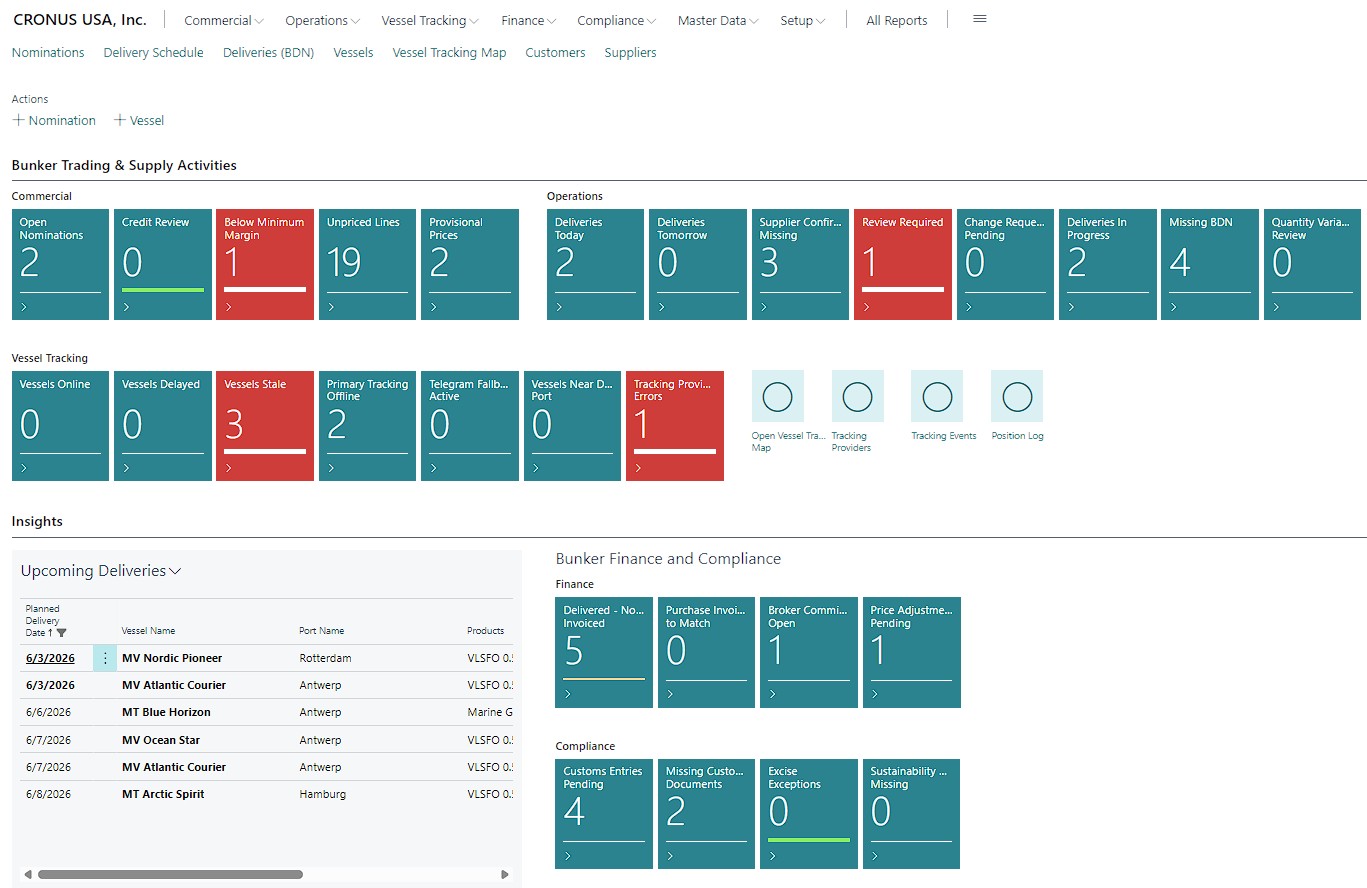
Your daily control center: see open nominations, margin exceptions, upcoming deliveries, tracking issues and uninvoiced work. Demo data shown. Select any screenshot to view it at full size.
One connected process
Keep the deal moving. Keep the details attached.
ExtBC Bunkering adds the marine fuel processes your team needs to the Business Central environment they already use, connecting vessel and delivery records with customers, vendors, inventory and accounting.
01
Nominate & price
Build the deal, compare suppliers and check margin and credit.
02
Plan & track
Confirm delivery windows, coordinate supply and monitor vessel positions.
03
Deliver & document
Record measurements, review variances and produce the Bunker Delivery Note.
04
Invoice & settle
Match invoices, settle commissions and compare expected with actual margin.
Commercial & operations
Control the deal before you commit.
Multi-port, multi-supplier nominations
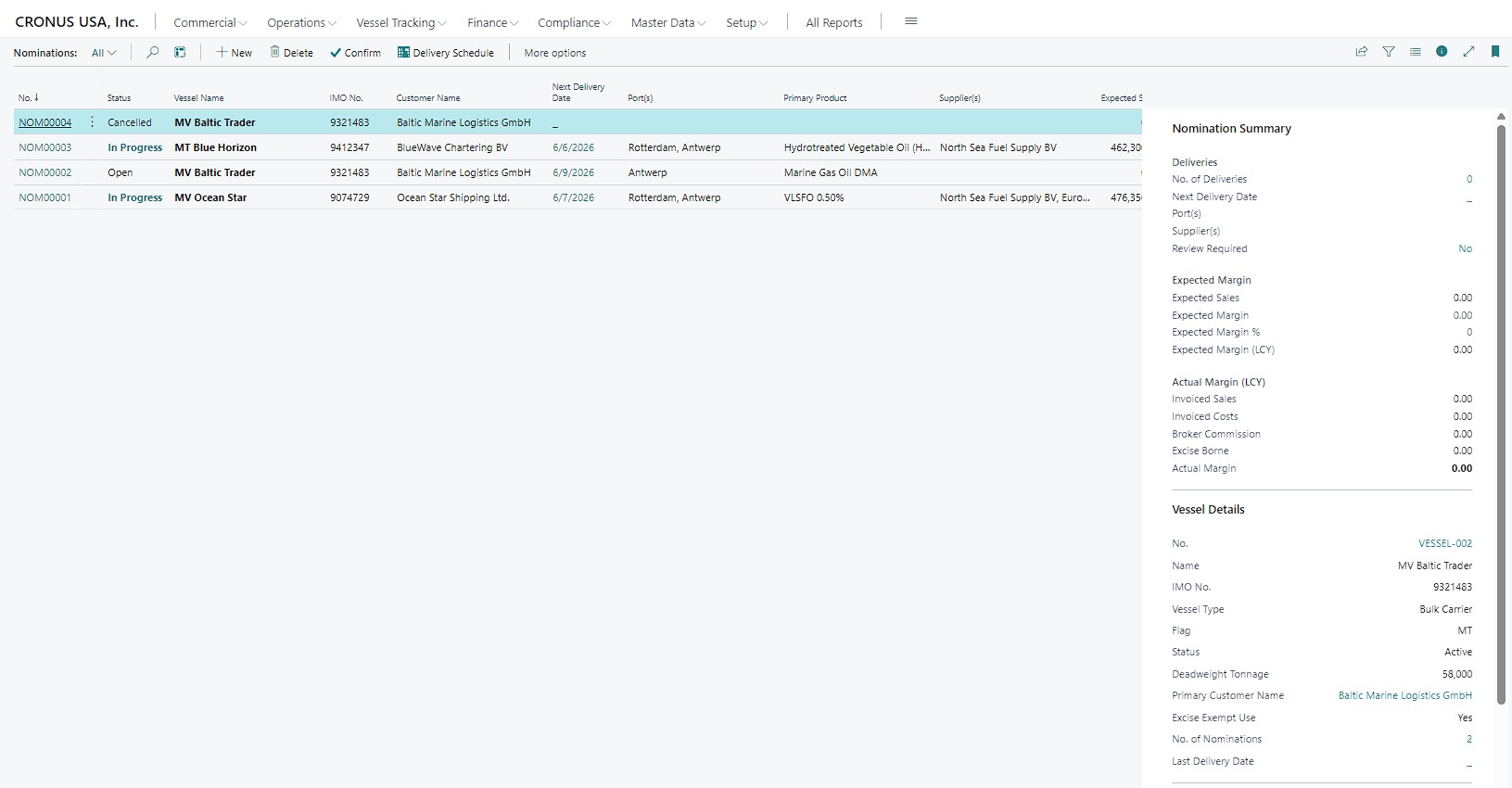
Manage several port calls, suppliers and fuel grades within one nomination. Keep customer agreements, ordering parties, payers, agents and brokers connected, with separate delivery windows, confirmations and status for each supply.
Flexible pricing & supplier comparison
Use spot, fixed, contract, market-index and formula pricing, including differentials and averaging periods. Compare supplier offers by port, product, date and quantity, with currency and unit conversions that make costs comparable.
Visible costs, margins & credit
Break prices into product costs, port and delivery charges, freight, commissions and other components. Review expected margins and customer exposure, including uninvoiced commitments. Apply configurable margin and credit warnings, blocks and approved exceptions.
Delivery schedules & controlled changes
Plan around ETA, ETB, ETD and requested delivery windows. Route changes to ports, suppliers, dates or quantities through review and approval after confirmation. Add further deliveries without reopening the entire nomination, and flag supplies that need reconfirmation.
Physical delivery & Bunker Delivery Notes
Take each delivery from preparation through completion and closure. Capture delivery times, meter readings, actual density, temperature, sulphur content and quantities. Generate BDNs, attach supporting certificates and review quantity variances against configured tolerances.
Truck, barge & trip management
Plan load, unload and transfer activities with route sequences, vehicles or supply vessels, drivers or operators, times and actual quantities. Keep telemetry records linked to the operation; connect external route planning and on-board data through integration providers.
The nomination workspace brings commercial commitments, delivery progress and vessel details together.
Vessel visibility
Know where the vessel is. See what needs attention.
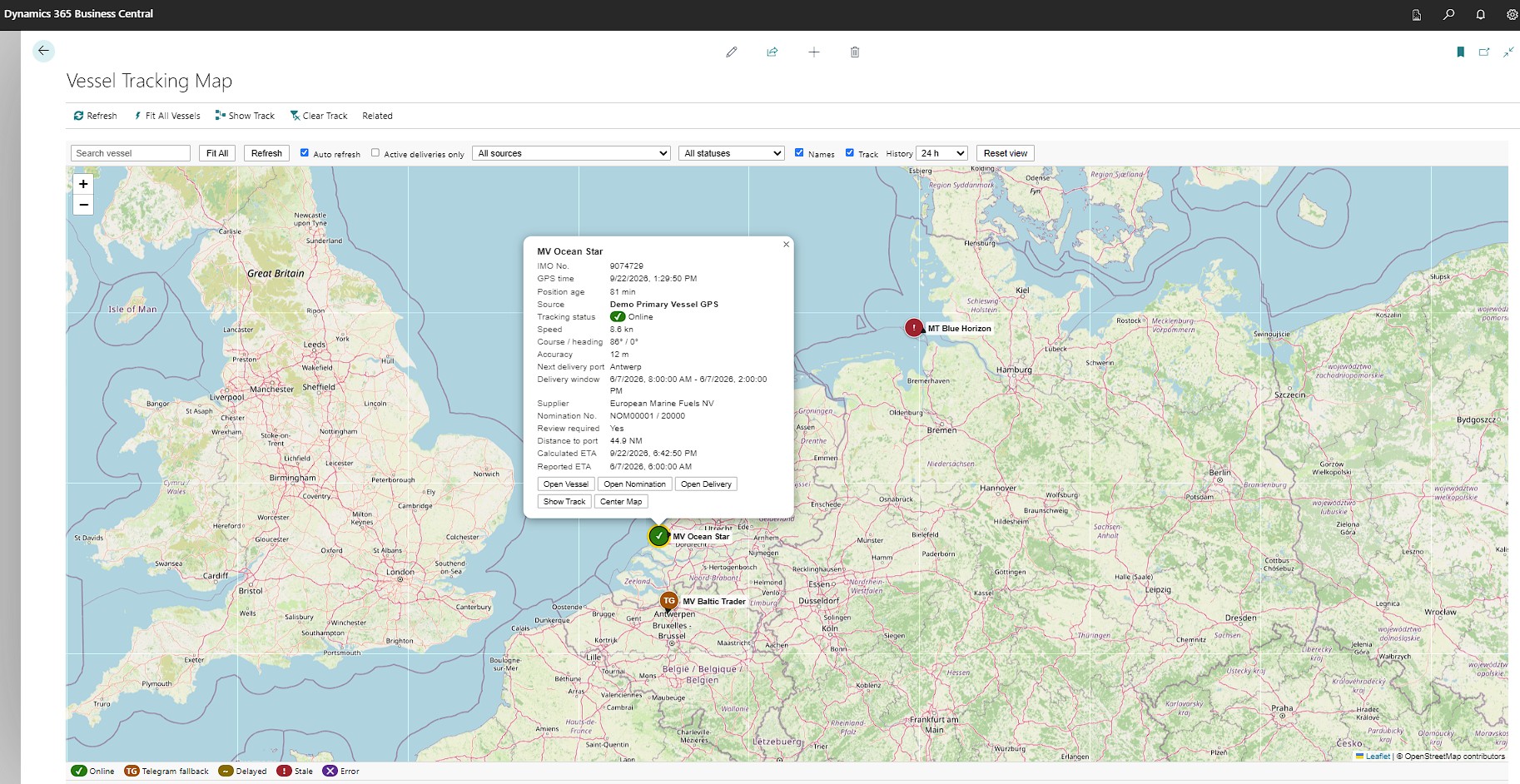
Put vessel positions beside the delivery context your team needs. A full-size map inside Business Central connects tracking information to vessels, nominations and planned deliveries.
Search vessels, filter by source or tracking status, focus on active deliveries and explore track history.
Connect GPS & AIS providers
Bring positions in through REST connections or a normalized push API. Set source priorities, refresh schedules and freshness thresholds. View position age, speed, heading and delivery context, with clear delayed, stale and error indicators.
Telegram as a reserve channel
Pair an authorized user with a vessel using a one-time token. Receive shared static or live locations as a fallback when the preferred source becomes stale. Automatically return to the preferred source when fresh positions resume, with source changes recorded.
History, proximity & tracking events
Review vessel tracks, distance to the delivery port and port geofence events. Open related operational records from the map and manage position-history retention. Tracking supports operational decisions; delivery completion remains a controlled action.
Tracking requires configured data providers and vessel mappings. Provider subscriptions, map services and any provider-specific adapters or webhook relays are scoped during implementation. Telegram fallback depends on an authorized user sharing location.
Finance, quantities & records
Turn completed deliveries into accountable results.
Density & temperature-aware quantities
Convert between mass, observed volume, standard volume and energy using the relevant density, temperature and product data. Retain the original measurements and correction basis, and use a parallel quantity ledger for stock reconciliation and reporting.
Business Central sales & purchasing
Create linked sales and purchase documents from planned or physical deliveries. Carry bunker references through standard documents and posting, using Business Central currencies, dimensions and posting setup. Billing-status cues highlight deliveries that are not fully invoiced.
Invoice matching & final settlement
Compare supplier invoices with purchase orders and physical deliveries, applying tolerance checks and exception review. Move from provisional to final pricing with linked adjustment invoices or credit memos, and compare expected margin with posted results.
Broker commissions
Calculate commissions per quantity, as a percentage, as a fixed amount or as a share of margin. Manage multiple commission entries, accrue costs and create settlement invoices while keeping the connection to the nomination and delivery.
Excise & customs administration
Configure jurisdictions, duty rates, decision rules, bonded-location details and exemptions. Create customs entries, track duty postings and reversals, and prepare period-based declaration worksheets with quantity totals and CSV export.
Sustainability & biofuel certificates
Link supplier evidence, feedstock, origin, batch, renewable content and GHG reduction data to each delivery. Calculate CO2 savings using recorded fuel energy content and GHG reduction data, and issue customer sustainability or CO2 reduction certificates with traceable source records.
Excise rules, reporting formats and volume-correction methods are configured and validated for the jurisdictions you operate in. Sustainability certificates reflect supplied evidence and recorded product data; FuelEU/ETS-specific calculations are a separate scope.
A shared operational foundation
Give every team the context to act.
Connected master data
Maintain vessels and barges, IMO/MMSI identifiers and dated owner, charterer, manager and payer relationships. Organize ports, terminals, berths and delivery locations alongside fuel grades, specifications and units of measure, including conventional and alternative fuels.
Documents, permissions & audit
Keep BDNs, quality and quantity certificates, laboratory reports and customs documents with the transaction. Define required documents at key stages, control sensitive approvals through permissions and retain an audit trail of changes, overrides and reversals.
Role Center & analytics
Prioritize work through cues for low margins, missing confirmations, delivery exceptions, tracking issues and outstanding billing. Use query/API datasets for reporting on deliveries, margins, price components, quantities, customs, commissions and sustainability, including Power BI integration.
Planning your implementation
Built around the way you supply fuel.
Does it support both traders and physical suppliers?
Yes. The product supports trader/back-to-back, physical-stock and hybrid operating models. Nomination and delivery settings let you reflect how each transaction is supplied, with the relevant inventory and posting configuration agreed during implementation.
Which integrations are included in the workflow?
The extension connects to standard Business Central sales, purchasing and accounting. It provides generic tracking connections, Telegram location ingestion and analytics APIs. Market-price feeds, external trip planning, telemetry imports and provider-specific connections require configuration and, where needed, an adapter or relay. Market prices and trips can also be maintained manually.
Can we use our existing Business Central setup?
The extension builds on Business Central customers, vendors, items, currencies, dimensions, attachments and standard sales and purchase documents. During the demo, we can review your Business Central version, posting setup, operating models and required integrations to define the implementation scope.
What can we see in a demonstration?
Walk through a nomination with multiple deliveries, compare supplier pricing, review margin and credit controls, explore the vessel map, record a BDN and follow the transaction into billing and settlement. Tell us your ports, fuel products and supply model so we can focus on your daily work.
See your next bunker deal end to end
Less chasing information. More control over every delivery.
Bring your trading and supply workflow. We will show you how ExtBC Bunkering can connect it inside Dynamics 365 Business Central and discuss the right implementation scope for your business.