Renewals and notice deadlines slip
Notice-by dates, renewal windows and scheduled alerts belong to named owners. A renewal workbench prepares renewal proposals in bulk instead of one spreadsheet row at a time.


Contracts that are managed, not just stored.
Keep customer and vendor agreements where your business already runs. Choose the app that fits how your organization works with contracts: EXTBC Contracts for risk-aware lifecycle management, or EXTBC Agreements for controlled routes, registration and document control. Each one installs on its own.
Buy Contracts & Agreements Management: One payment — licence does not expire · Card payment is closed at the moment — these open the enquiry form below and we will arrange it from there.
One governed register for every customer, vendor and partner agreement, built into Business Central. Check risk before you sign, keep approvals and signatures on the record, and give every obligation and notice date an owner, so renewals and commitments never depend on someone’s memory.
Built for legal, sales, procurement, finance and compliance teams. Works for customer, vendor and multi-party agreements.
Most contract trouble is visible in advance, if the right person sees it at the right time. EXTBC Contracts puts that information in front of the people who can act on it.
Notice-by dates, renewal windows and scheduled alerts belong to named owners. A renewal workbench prepares renewal proposals in bulk instead of one spreadsheet row at a time.
Seventeen built-in checks, from unlimited liability to a missing termination right, score each contract before approval. High risk can hold back the approval request.
A review matrix routes each contract by amount, risk, governing law, personal data and more. Decisions, comments and the document version stay on record.
Commitments get owners, due dates, recurrence, required evidence and KPI targets, with escalation when something goes overdue.
Screenshots from a Business Central demo company. Select an image to open it at full size.
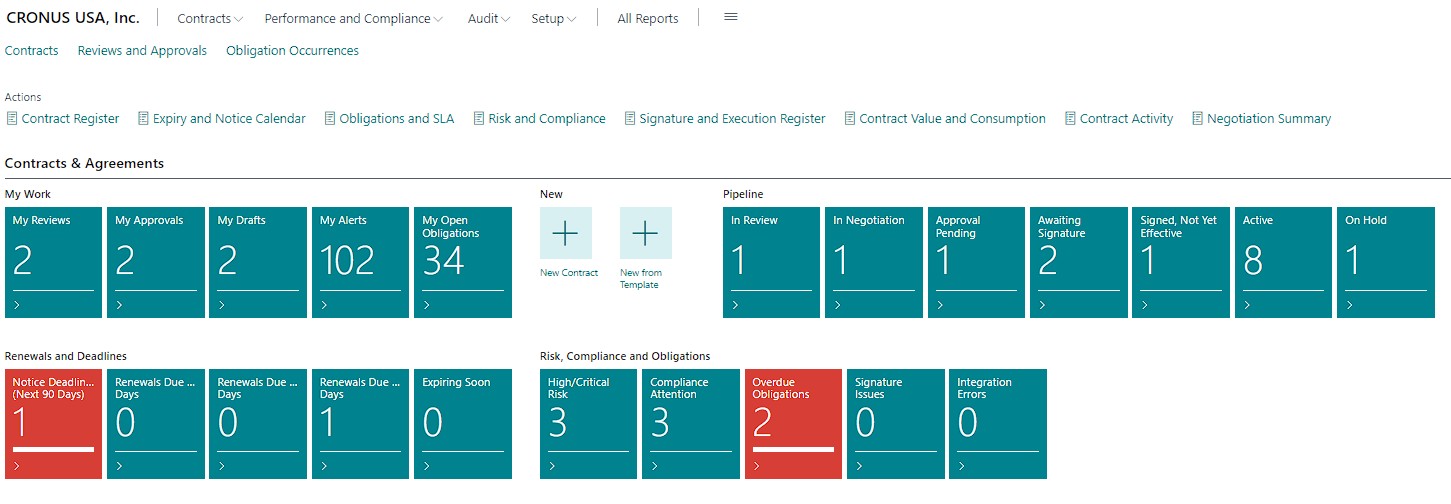
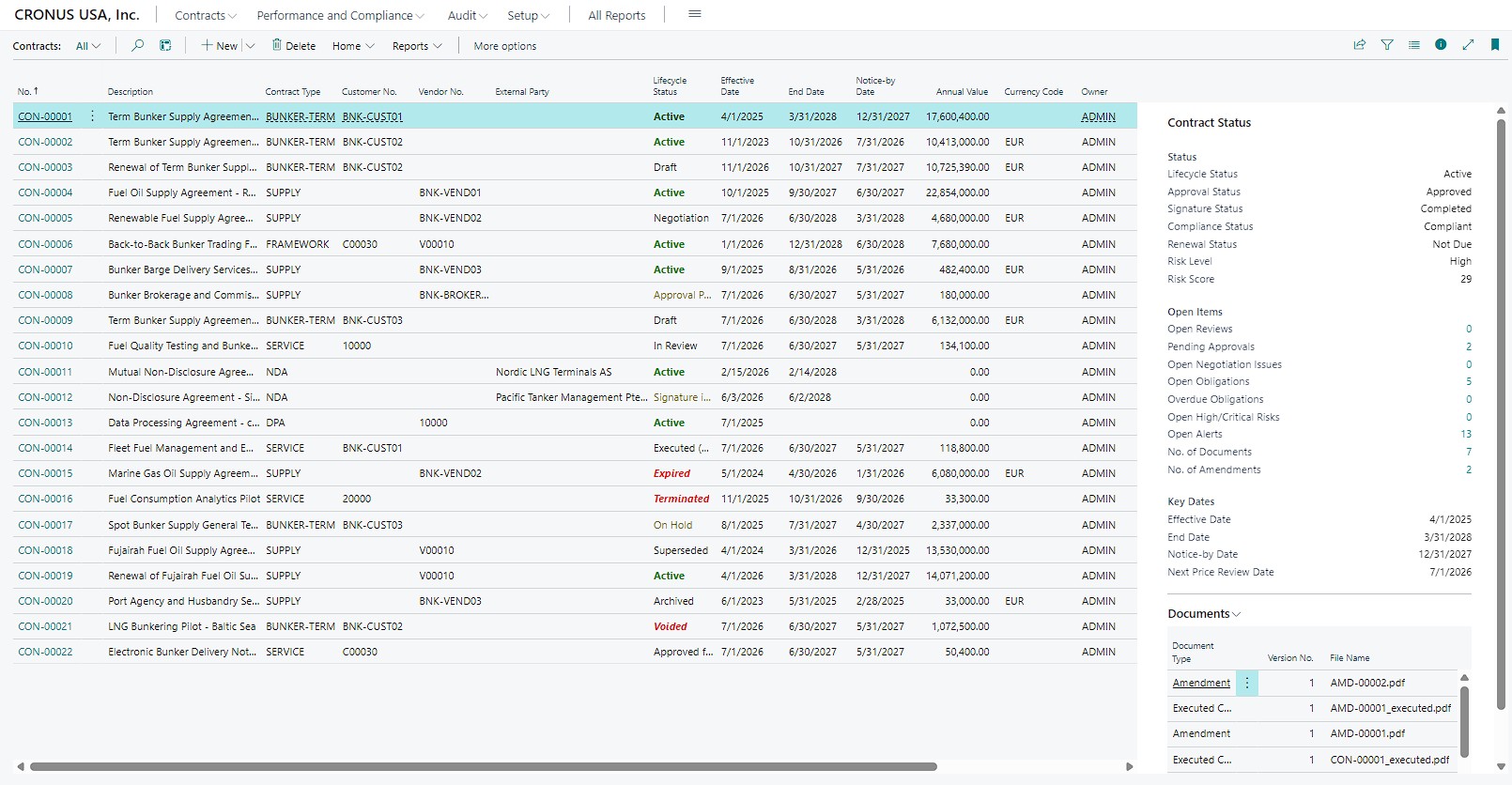
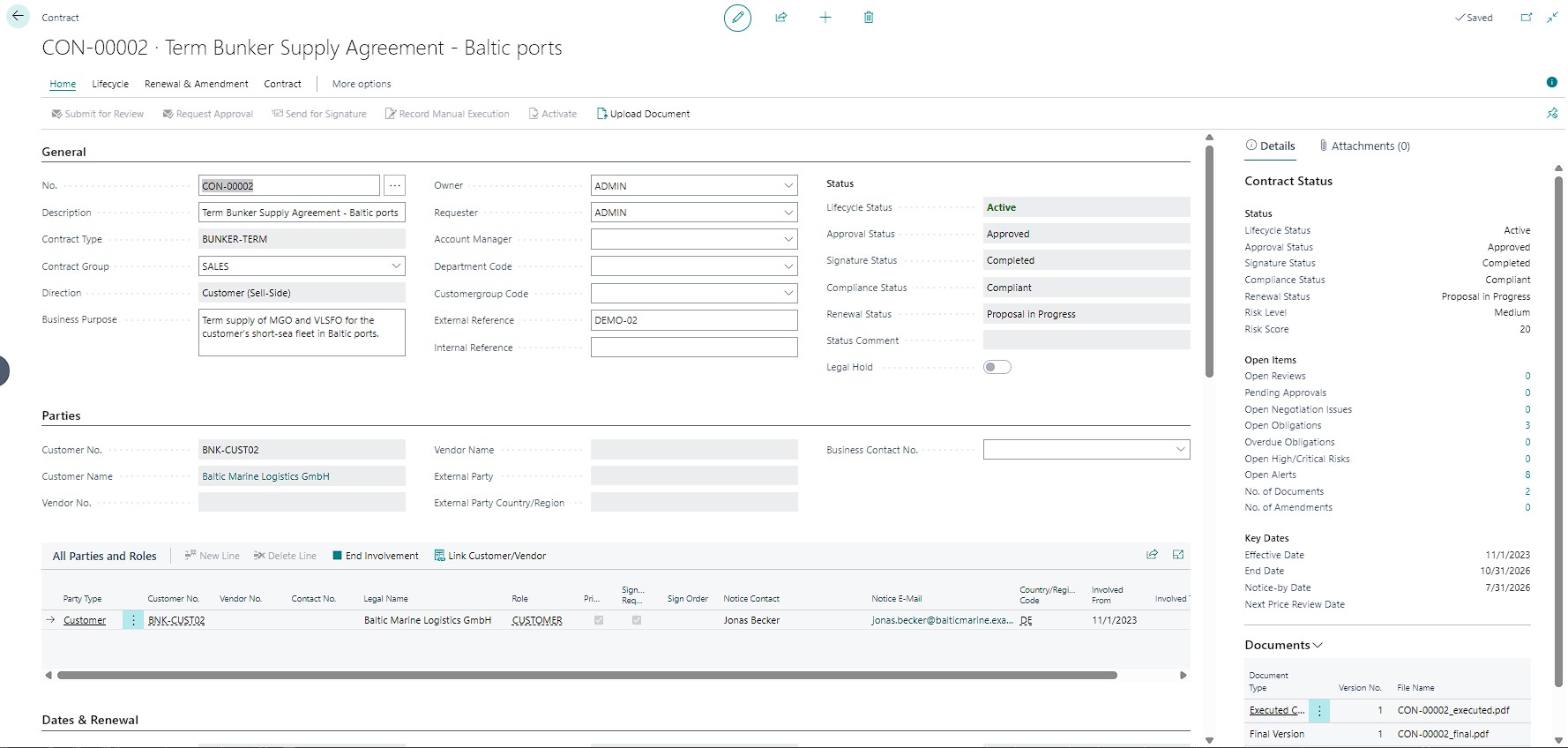
Contracts attach to the Business Central records your teams already use, not to a single field or a separate register. From any card, see which agreements exist, what they are worth and what needs attention.
Open customer contracts, master service agreements, NDAs, sales agreements, SLAs and amendments from a related contract list. Review status, value, owner, effective dates, renewal windows and outstanding obligations before the next conversation.
Review vendor agreements, purchasing terms, service commitments, insurance and certification requirements, notice periods and upcoming renewals. Give procurement and finance one consistent view of every supplier relationship.
Turn contract administration into a repeatable process with clear responsibility, controlled changes and traceable decisions.
Draft from approved templates and a reusable clause library. Generate the contract and formal notices from Word layouts, and require approved templates when your policy says so.
Record negotiation rounds, issues and communications against each version. Open high-priority issues can hold back the approval request until they are resolved.
Seventeen built-in checks with adjustable weights and thresholds give each contract a risk level and a recorded explanation. Risk is reassessed on submission, approval request, activation and every day.
Route contracts to the right reviewers by type, amount, risk, governing law and more. Run reviews in parallel or in sequence, delegate, escalate overdue tasks, and stop requesters approving their own contracts.
Record signing by hand or connect an e-signature provider. The approved version and its hash are what get sent, and the signed copy and audit trail are checked before the contract goes live.
Assign commitments to owners with due dates, recurrence and required evidence. Compare KPI targets with actuals, flag breaches and escalate whatever runs overdue.
Calculate end and notice-by dates on calendar or business days, and work through renewals in a dedicated workbench. Prepare, approve and send formal notices from a Word layout.
Keep structured contract lines and commercial terms, then create sales and purchase documents from them at standard pricing. The contract reference follows to posted invoices and credit memos.
A Role Center with cues, ten reports and ready-made queries for Power BI show the portfolio, renewal pipeline, obligations, risk and execution at a glance.
Lifecycle status, approval, signature, compliance and renewal progress are tracked separately, so everyone can see what has happened and what must happen next.
Start from a template and the clause library. Identify the parties, owner and key dates.
Collect feedback, track issues and rounds, and run the risk checks.
Route approvals through the matrix, then send for signature or record manual execution.
Work obligations, milestones, KPIs, alerts and compliance tasks.
Amend, renew, expire or terminate, with open items checked before close-out.
A contract register is only useful if people can trust it. EXTBC Contracts keeps the evidence behind every material decision and protects signed terms from silent change.
It complements standard Business Central records and posting controls rather than replacing them. Contracts never post, so your ledgers stay exactly where they are.
Every document version carries a hash and is locked on submission, approval, signature and execution. Changes go through amendments, not overwrites.
An append-only event log records who did what, when and why, with the document version involved.
Approval limits, separation of duties and named authorities for signing, accepting risk and overrides, plus restricted groups for confidential agreements.
Scheduled jobs raise each alert once, with an owner and an escalation level. Alerts can reach Teams through Power Automate.
Submitted contracts are voided or archived, never deleted, and a legal hold blocks deletion altogether.
The base scope covers contract records and lifecycle control. Integrations are added to match your existing technology, licensing and governance requirements.
Need routed approvals, registration numbers and tracked originals? EXTBC Agreements runs every contract through a controlled route, from template to signed original.
See EXTBC AgreementsTake every contract from template to signed original on a route you control, inside Business Central. Fill the contract from a template, approve it through your own routes, register it, collect signatures, track the original copies and follow execution to the final payment. Each kind of contract behaves the way your policy says it should.
Built for contracts offices, procurement, finance and the departments that raise the contracts.
Agreements rarely fail in the clause. They fail in the hand-offs: the wrong approver, the lost original, the payment nobody checked against budget. EXTBC Agreements puts each hand-off on a route and keeps the evidence.
Contract kinds set the number format, template, approval route, mandatory fields, required files and execution stages. Each type behaves the way policy says, without custom code.
Sequential, parallel and conditional steps with due dates in working days, delegation and a printable approval sheet. A rejected contract goes back to its author, and the next cycle keeps the history.
Versioned files live inside Business Central. Every paper copy sent and returned is logged, overdue copies are flagged, and a Missing Originals report shows what is outstanding.
Financing lines must add up to the contract amount. Budget is reserved on submission, released on rejection and consumed as linked invoices are posted.
Screenshots from a Business Central demo company. Select an image to open it at full size.
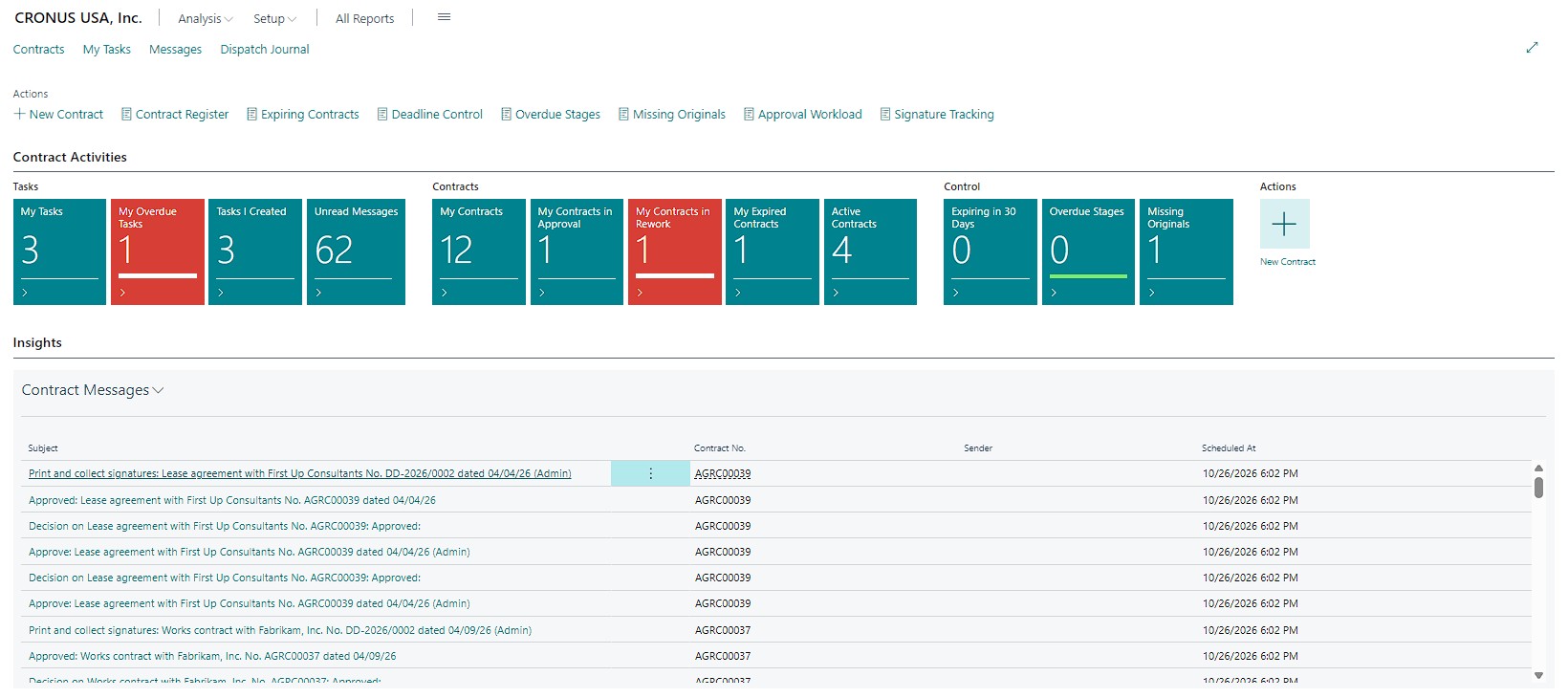
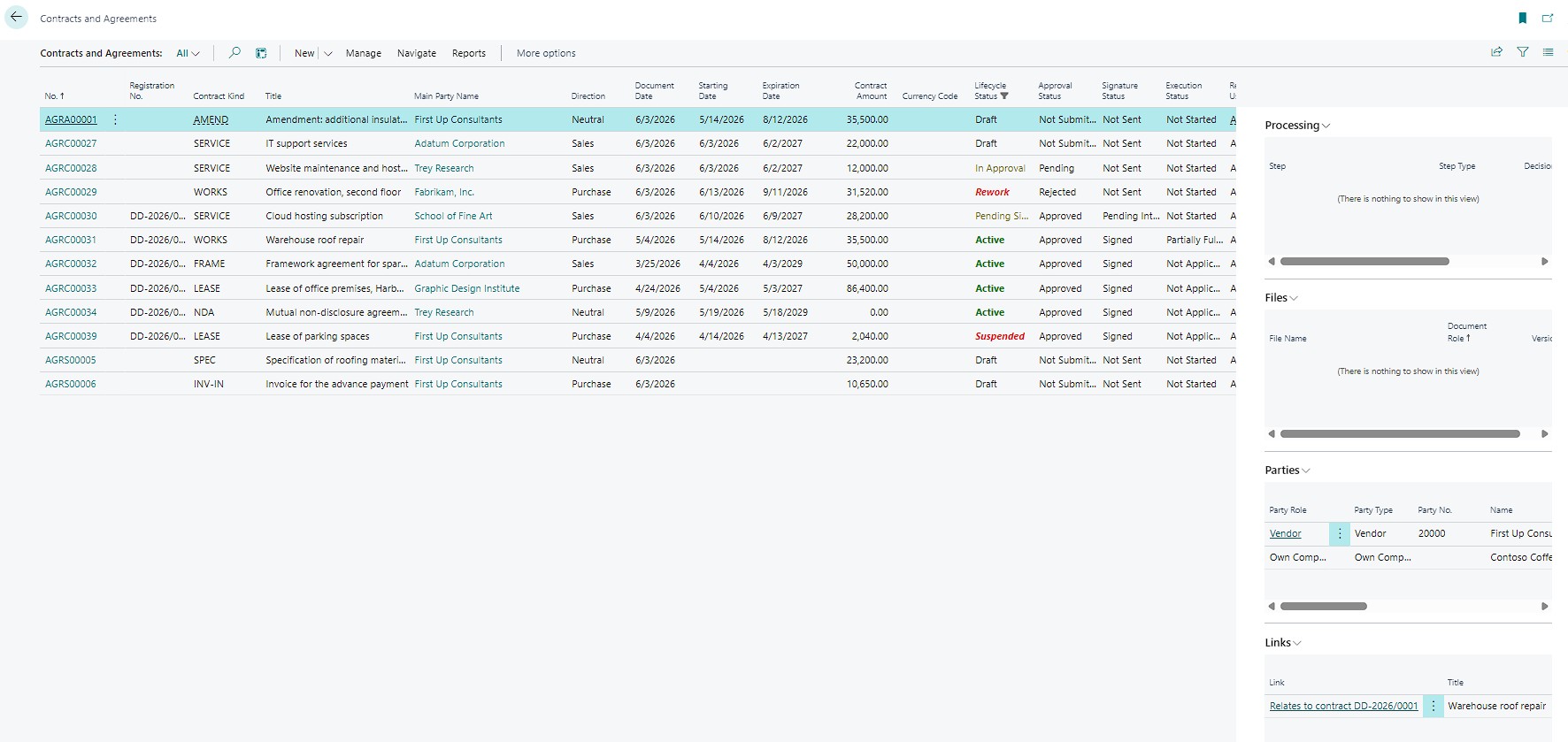
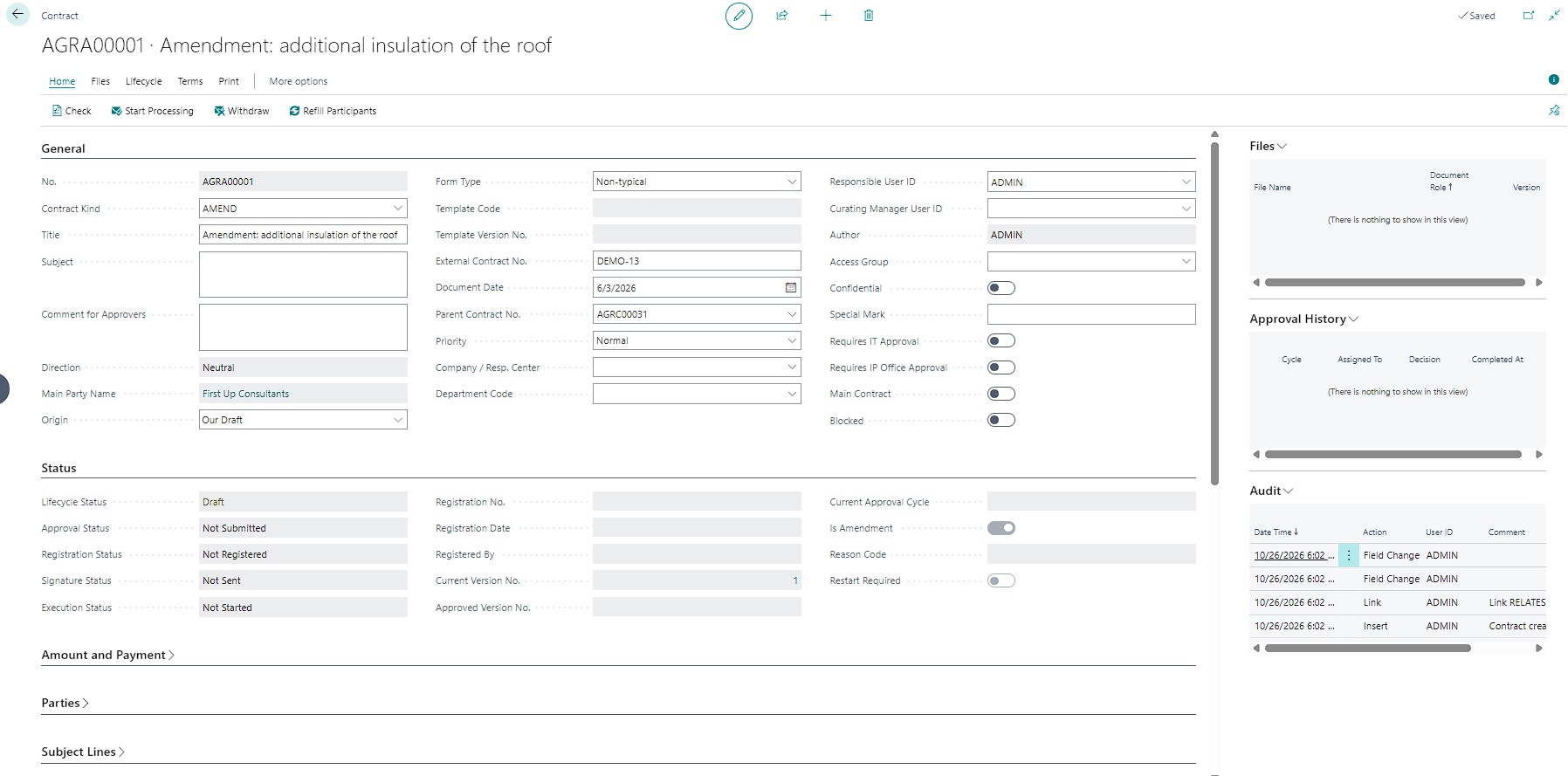
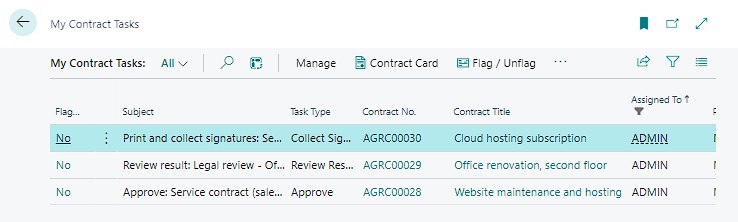
Approvals, registrations, signatures and execution steps arrive as tasks, with the contract one click away. Approve, register, sign, execute, review a result or collect signatures, and the route moves on.
One route, set up once and applied every time, with clear responsibility, controlled changes and a record of every decision.
Supply, works, services, licences, leases, NDAs, framework agreements and more. Each kind has its own numbering, template files, route, mandatory fields, required file types, stage template and custom attributes.
Generate the contract text from Word layouts filled with parties, lines, financing and agreed terms. Templates are versioned, a kind can hold several files per party type, and approval sheets and consent forms come from the same engine.
Routes are chosen by kind, direction, amount, currency and confidentiality. Run steps in sequence, in parallel or on condition, delegate with a reason, and approve, approve with comments or reject with a reason code.
When a step says no, the author reviews the result, corrects the contract and repeats or ends the process. Earlier approvals can be kept, and a material change after approval always means re-approval.
Registration numbers follow your own format, for example SUP-2026/0014, with a live sample in setup. A registrar can refuse with a reason, and the parties’ legal details are frozen at registration.
Sign on paper, by e-mail PDF or through an e-signature provider, with status tracked from internal to counterparty. Log every copy sent and returned, with due dates and overdue alerts.
No separate file server. Check files out and in, require the right file types before submission, lock approved versions, and export a complete dossier with the approval sheet.
Stages are generated on activation, for example an advance at signing plus ten days, then delivery, acceptance and final payment. Payments, deliveries and returned originals complete them automatically.
Reserve budget against financing lines and see what is left before you commit. For regulated purchasing, add procurement method, justification, required evidence and quota checks.
Create an amendment from an active contract, run it through its own route and see the full chain in a link tree. When it goes live, the parent contract moves to a new version and the old one is superseded.
Pick or create counterparties, validate EU VAT numbers through VIES, and paste in a list from a spreadsheet without creating duplicates. One contract can have many parties, and one party many contracts.
Approvers, registrars and executors work from a personal task list. Reminders for approvals, expiry, notice dates, stages and returned originals run through the Job Queue, are never sent twice, and stop as soon as the issue is resolved.
Lifecycle, approval, signature and execution status are tracked independently, so nobody has to guess whether a contract is approved, signed, in force or fulfilled.
Pick a kind and the parties, generate the text from the template and attach the required files.
Start processing, run the route and the budget check, and rework until every step is positive.
Issue the registration number and freeze the parties’ legal details.
Collect signatures on paper, by e-mail PDF or through a provider, and log each original.
Follow stages, payments and deliveries, with alerts for anything overdue.
Amend, renew, expire, terminate, close and archive, with open items checked first.
The contract number travels onto sales, purchase and service documents, their posted versions, and customer and vendor ledger entries, so you can always trace money back to the agreement behind it.
Contracts never post. Standard Business Central documents execute the transactions, and the contract reads from them to show commitment and fulfilment.
When a contract is chosen and again before posting, the app checks that it is active, not blocked, matches the party, direction and currency, covers the document date and still has limit left.
Mark a default contract per customer or vendor and kind, proposed automatically on new documents. Start a draft contract straight from a sales or purchase document.
Create sales or purchase orders from the lines still open on a contract, so quantities and prices come from what was agreed.
Customer, vendor and contact cards show contracts by status and what expires soon, and every contract shows its commitment and fulfilment figures in a FactBox.
Permissions are checked inside the app for every read, export and action, not just hidden behind a button. Contracts that matter stay visible only to the people who should see them.
Confidential contracts are visible only to their access group and named participants, in lists, FactBoxes, reports, APIs and search alike.
Personal data of individual parties shows only to users with a dedicated permission, and a consent file is required before submission.
Self-approval is blocked unless a route step explicitly allows it. Any admin bypass needs a reason and is marked on the approval sheet.
Approved versions, decisions and every status change are recorded and protected from ordinary users, with an Audit Trail report on top.
The base scope covers the contract route inside Business Central. Providers and services are plugged in through open interfaces, so you can choose what fits your country and your licences.
We can show EXTBC Agreements in a demo company with sample contracts at every stage: in approval, in rework, registered, active, overdue originals, expired, terminated and closed.
Need risk scoring, obligations and a renewal workbench? EXTBC Contracts is built for managing a portfolio of agreements after they are signed.
See EXTBC ContractsEach app is a complete extension that installs on its own. Choose by how your organization works with contracts.
| EXTBC Contracts | EXTBC Agreements | |
|---|---|---|
| Built around | A governed register with risk, obligations and renewals at its core | A controlled route from template to signed original, then execution |
| Typical users | Legal, commercial, procurement and compliance teams | Contracts offices, procurement, finance and requesting departments |
| Drafting | Approved templates, clause library, negotiation rounds and issues | Contract kinds, Word templates with auto-filled fields, versioned template files |
| Approval | Review matrix by type, amount, risk, governing law and more, with separation of duties | Routes with sequential, parallel and conditional steps, delegation, rework cycles and an approval sheet |
| Risk and compliance | 17 built-in risk checks, compliance checklists and risk-based approval blocking | Mandatory fields and file types per kind, procurement checks, confidential access and personal data masking |
| Signing | Manual execution or an e-signature provider, with the signed copy and audit trail verified | Paper, e-mail PDF or an e-signature provider, with dispatch and return of originals |
| After signature | Obligations, milestones, KPI targets, notices and a renewal workbench | Execution stages completed from postings, budget reservation and commitment figures |
| Business Central link | Contract reference on sales, purchase and service documents and posted invoices | Contract number on documents, posted documents and ledger entries, validated before posting |
| Reports and insight | Role Center, 10 reports and queries for Power BI | Role Center, task list, 18 reports and APIs |
Describe how your team creates, approves, signs and monitors contracts. We will map your process to EXTBC Contracts or EXTBC Agreements and outline the integrations and rollout phases that fit your organization.