ExtBC

Sales Planning for Dynamics 365 Business Central

Buy Sales Plan: One payment — licence does not expire  ·  Card payment is closed at the moment — these open the enquiry form below and we will arrange it from there.

EXTBC · Business Central Solutions

Turn sales targets into measurable execution.

Sales Plan for Microsoft Dynamics 365 Business Central connects sales goals, quotas, lead generation, pipeline forecasting and performance reporting in one coordinated planning process.

Plan with clarity. Track performance. Act before gaps become missed targets.

Sales Performance Overview
Dashboard
Sales target
Plan by period
Actual sales
Track posted results
Open pipeline
Review active deals
Forecast gap
Act earlier
Plan vs. Actual · by period
PlanActual

Inside Business Central

See Sales Plan at work

Screenshots from a Business Central demo company. Select an image to open it at full size.

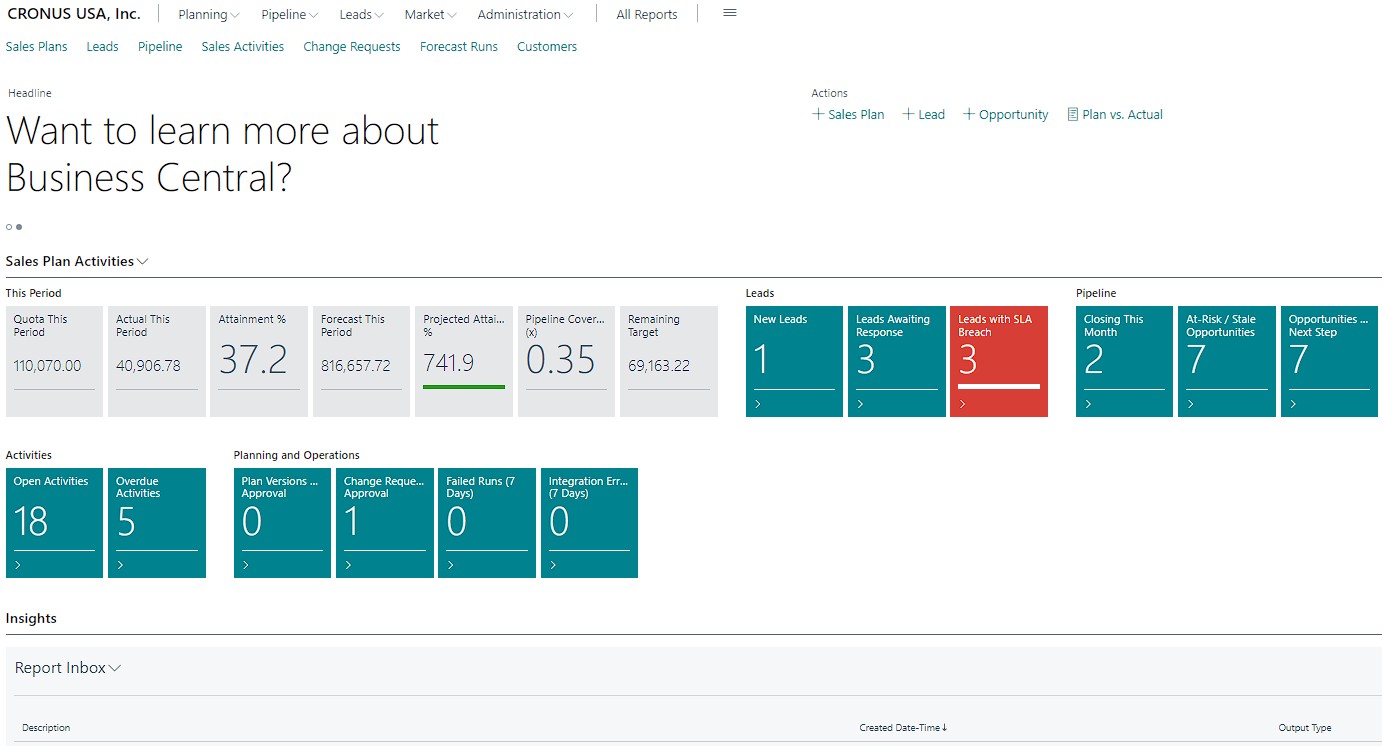
Sales Plan Role Center in Business Central with this period's quota, actual, attainment, forecast and pipeline coverage, and cues for leads, pipeline, activities and plan approvals
Role Center. Quota, actual, attainment, forecast and pipeline coverage for the current period, alongside cues for new leads, SLA breaches, at-risk opportunities, overdue activities and approvals waiting on plan versions and change requests.
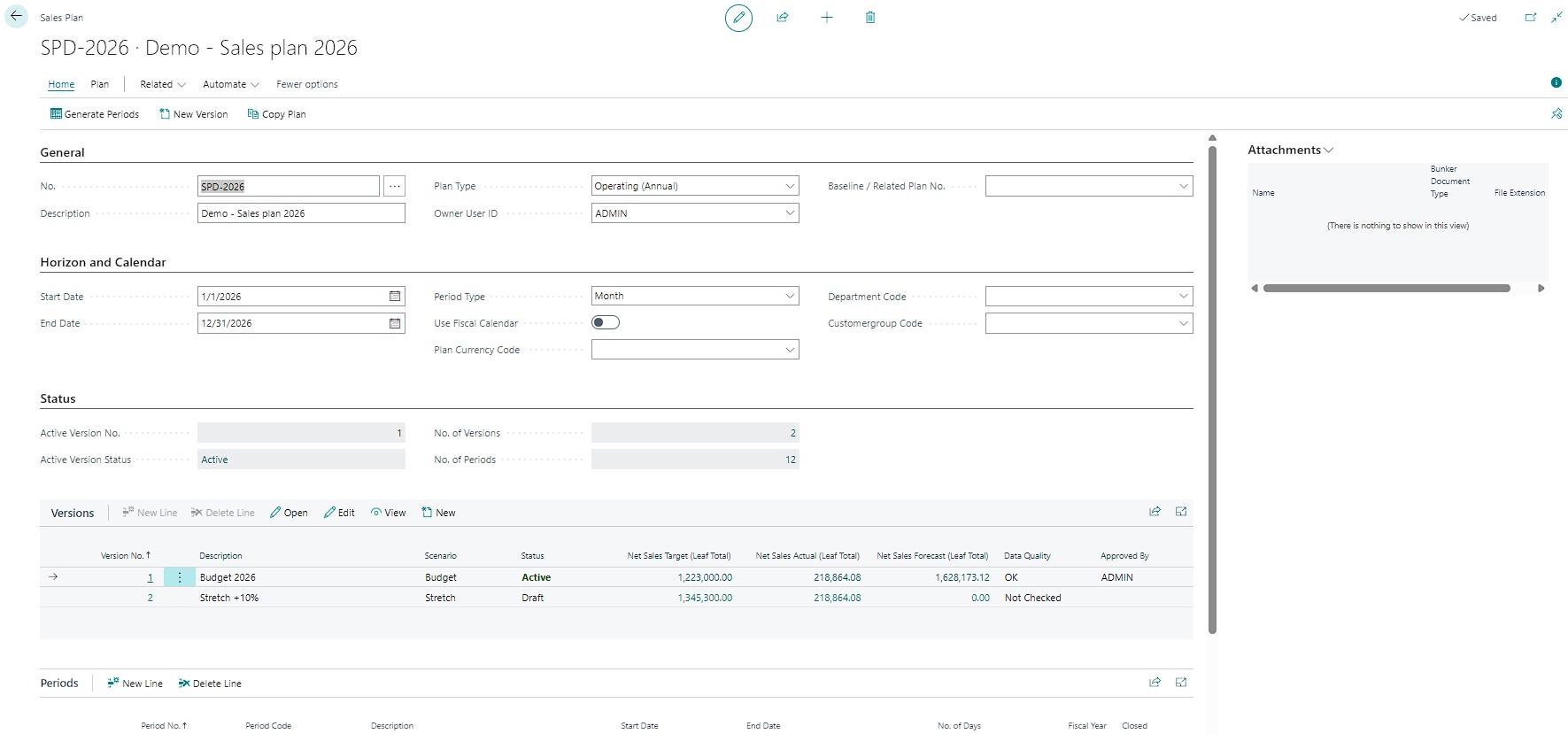
Sales plan card in Business Central with horizon and period calendar, and budget and stretch versions showing target, actual and forecast totals
Sales plan. Horizon and period calendar, with a version for each scenario, such as budget and stretch, showing its target, actual and forecast totals, data quality and approval.
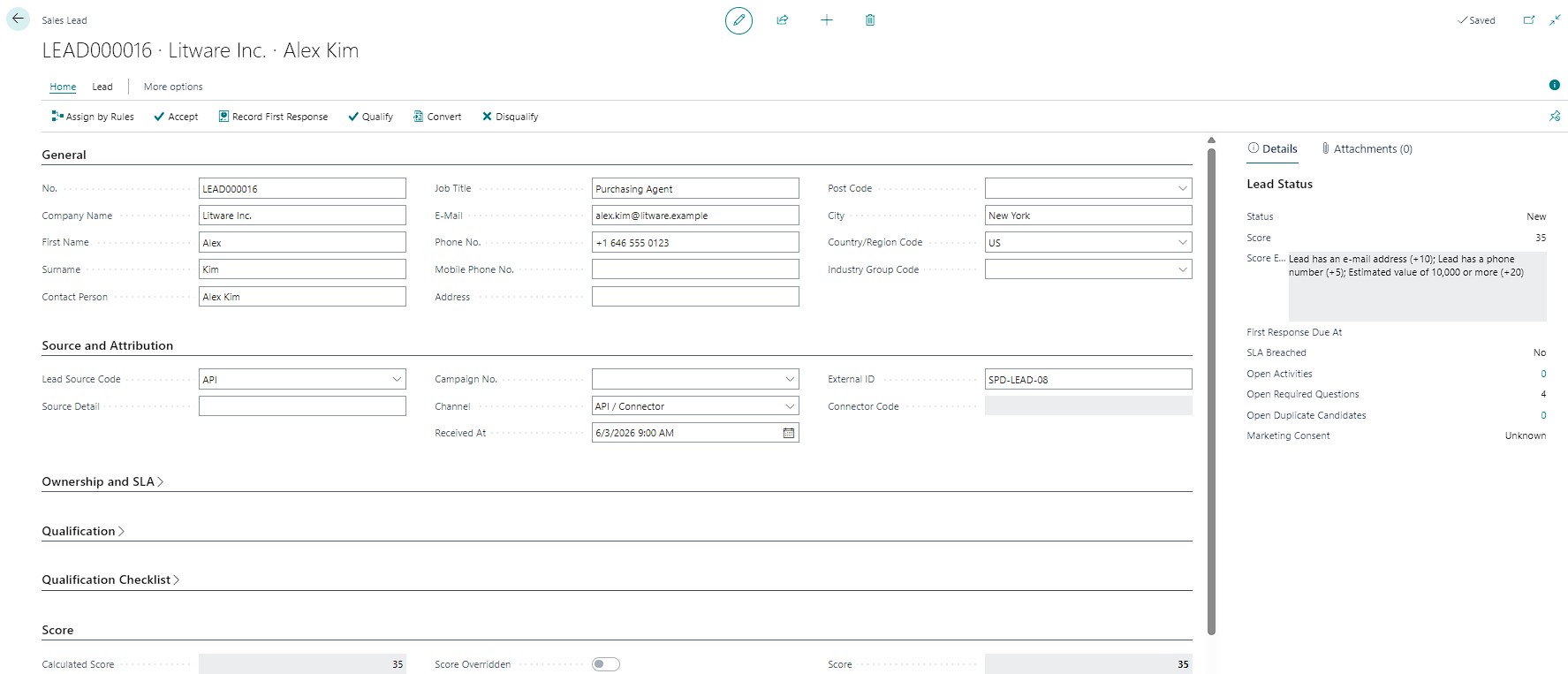
Sales lead card in Business Central with source and attribution, lead score explanation, SLA status and duplicate candidates
Sales lead. Source and attribution, a lead score that explains itself, first-response SLA and duplicate candidates, with actions to assign by rules, qualify, convert or disqualify.
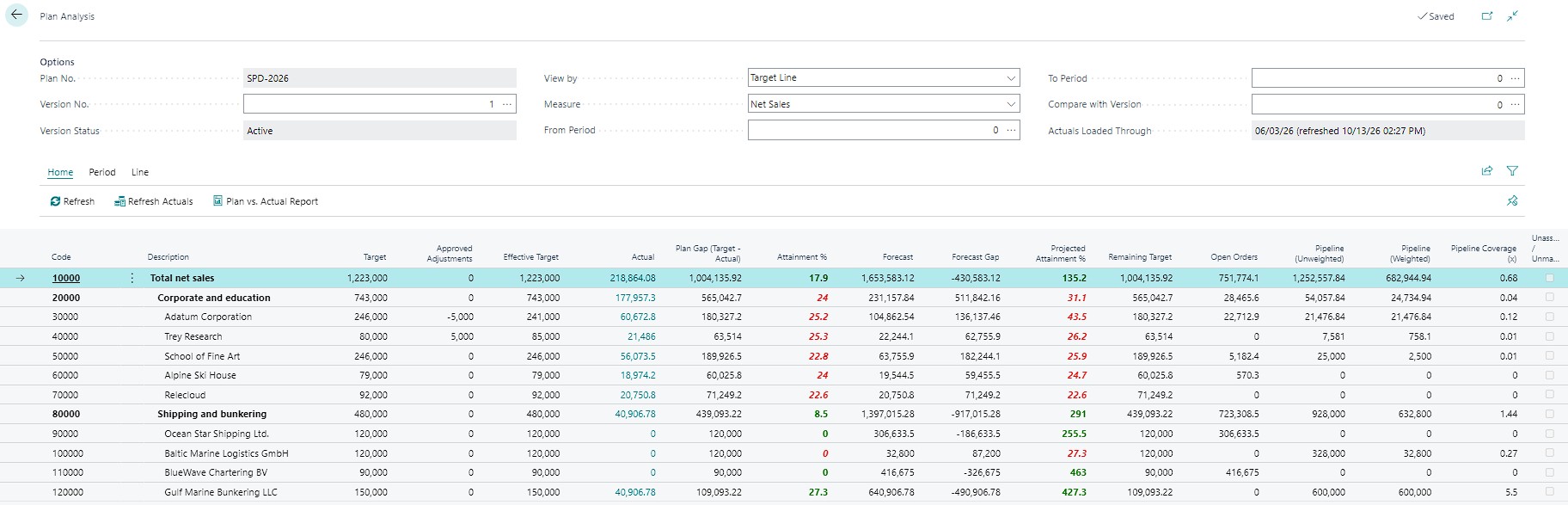
Plan Analysis in Business Central comparing target, actual, forecast and pipeline for each line of the sales plan
Plan analysis. Target, approved adjustments, actual, plan gap, attainment, forecast, projected attainment, open orders and weighted pipeline for every line of the plan hierarchy.

One connected planning hub

From sales strategy to the next best action

Bring the essential parts of sales planning together. Give leaders a clear view of where the business is going and give sales teams a practical path to get there.

Goals & quota distribution

Translate company objectives into sales targets for business units, territories, teams and individual salespeople.

  • Annual, quarterly and monthly plans
  • Top-down and bottom-up allocation
  • Revenue, margin, volume and activity goals
  • Approval, versioning and quota attainment

Target audience & account planning

Organize customers and prospects into meaningful groups, and focus sales effort on the opportunities with the greatest potential.

  • Customer segments and ideal customer profiles
  • Territory and account coverage
  • Customer potential and growth opportunities
  • Competitor and market assumptions

Lead generation & qualification

Capture leads from different sources, assess their fit and help the right salesperson follow up on time.

  • Manual entry, imports and configured integrations
  • Source attribution and duplicate checks
  • Qualification criteria and lead scoring
  • Ownership, response SLAs and conversion tracking

Pipeline management & forecasting

Understand which deals can deliver the plan, what is at risk and where the pipeline needs attention.

  • Configurable opportunity stages and stage gates
  • Weighted and unweighted pipeline
  • Best case, commit and other forecast categories
  • Stale-deal alerts and win/loss analysis

Performance dashboards

Compare approved targets with posted results and current forecasts, with a path from summary numbers to source records.

  • Plan vs. actual and forecast gap
  • Revenue and gross-profit analysis
  • Quota attainment and pipeline coverage
  • Lead conversion and forecast accuracy

Execution & accountability

Turn plan reviews into practical tasks with owners, due dates and follow-up actions.

  • Sales activities and task queues
  • Stage-based playbooks and checklists
  • Overdue action and response alerts
  • Follow-up ownership and activity outcomes

Pricing & margin guardrails

Align commercial ambitions with profitable sales by monitoring planned and realized margin.

  • Minimum margin and discount thresholds
  • Exception requests and approval records
  • Planned vs. realized pricing analysis
  • Product-mix and profitability insights

Controlled plans & approvals

Keep the planning process transparent with version control, approval steps and a traceable history of changes.

  • Draft, review, approved and closed states
  • Locked approved plan versions
  • Controlled amendments and resubmission
  • Role-based access and audit trail

Flexible planning scenarios

Evaluate alternative assumptions without overwriting the approved plan or changing posted transactions.

  • Baseline, optimistic and conservative scenarios
  • Manual forecast adjustments with explanation
  • Period and product-mix assumptions
  • Comparable saved forecast runs

Plan with confidence

Make targets clear, balanced and actionable

Build a sales plan around your organization's structure, then distribute targets to the people responsible for delivering them. Use one planning framework to review progress by period, salesperson, team, territory, customer segment or product group.

✓
Set measurable objectivesDefine financial and operational targets with clear time periods and calculation rules.
✓
Allocate and rebalance quotasDistribute parent targets across teams and salespeople, identify gaps and track approved allocations.
✓
Protect the approved baselineKeep approved plan versions stable and manage changes through controlled amendments.
Quota allocation overviewDashboard
Company sales planParent target
Approved plan value100% allocated
Region / territoryAllocation
Regional quota distributionReview coverage
Sales teamAllocation
Team-level responsibilityCheck balance
Individual salespersonQuota
Period target and attainmentTrack progress

A connected sales workflow

Move from first contact to measurable results

Coordinate the steps across planning, sales activity and financial outcomes, while maintaining a clear record of ownership and progress.

Set the plan

Define goals, periods, assumptions and target allocation rules.

Find the audience

Segment accounts and prospects by fit, potential, territory and priority.

Qualify & progress

Capture leads, schedule actions and advance opportunities through sales stages.

Forecast & adjust

Review pipeline, open orders, scenarios and gaps against the approved plan.

Measure results

Compare the plan with posted sales, margin and conversion performance.

Performance that tells a story

Understand what is driving sales performance

Go beyond a single revenue number. Analyze the indicators that explain progress, reveal risk and help managers decide where to focus next.

Quota attainmentActual sales or other defined measures compared with the approved target.
Pipeline coverageQualified pipeline compared with the remaining target, using the selected weighted or unweighted method.
Forecast accuracyCompare saved forecasts with actual outcomes to improve future planning.
Gross-profit performanceMonitor sales value alongside margin and profitability guardrails.
Lead conversionFollow leads from source and qualification through opportunity and sale.
Win/loss analysisIdentify recurring loss reasons, competitive pressure and product gaps.
New-customer acquisitionTrack new customers against plan using agreed definitions and source records.
Sales activity healthSee overdue follow-ups, stalled deals and next actions that need attention.

Designed for Business Central

Extend your existing sales and finance processes

Sales Plan is designed to complement Business Central rather than create a parallel sales or accounting system.

Customers & contacts

Use customer and contact information as the foundation for account planning, segmentation and lead conversion.

Opportunities & campaigns

Link commercial pipeline and campaign activity to sales targets, source attribution and conversion analysis.

Quotes & orders

Connect qualified opportunities with standard sales documents while avoiding duplicate pipeline value.

Posted sales & margin

Calculate actual performance from posted transactions using finance-approved mapping and reconciliation rules.

Dimensions & reporting

Analyze performance across relevant business dimensions and provide drill-down to supporting records.

APIs & optional integrations

Support defined interfaces for approved lead sources, reporting tools and external CRM or marketing systems.

Integration availability depends on the Business Central environment, selected modules, licensing, configuration and any external connector required. The sales planning forecast is intended for commercial targets and opportunity pipeline; it is not a replacement for Business Central's inventory demand forecasting.

Frequently asked questions

Sales planning, made practical

What is Sales Plan for Business Central?

Sales Plan is a planning and execution layer that connects sales targets, quotas, leads, opportunities, commercial forecasts and performance reporting with Business Central's operational and financial data.

Does it replace standard Business Central sales functionality?

No. Sales Plan reuses standard Business Central capabilities wherever practical, including customers, contacts, opportunities, campaigns, sales documents, dimensions and posted sales records. The extension adds planning controls, target allocation, connected forecast views and sales-specific analysis.

Can targets be assigned to individual salespeople, teams and territories?

Yes. Targets can be allocated across company, business unit, territory, team and salesperson, with period-based quotas and configurable planning dimensions. The exact hierarchy is set up during implementation.

Which performance indicators can be analyzed?

KPIs include quota attainment, plan-versus-actual revenue, gross profit, pipeline coverage, forecast accuracy, lead conversion, win/loss rates, new-customer acquisition and activity completion, each with defined calculation and inclusion rules.

Can Sales Plan connect to external CRM or marketing platforms?

Sales Plan can connect to external systems through defined APIs and connectors. Availability depends on the target system, data ownership, authentication, mapping and connector implementation. External integrations are not assumed to be enabled automatically.

How are actual sales values kept reliable?

Actuals come from posted Business Central transactions under a finance-approved mapping, with consistent date and currency policies, reconciliation controls and drill-down to source records. Open quotes and orders are forecast inputs rather than posted actual sales.

Build a sales plan your team can execute.

Define the targets that matter, connect them with day-to-day sales activity and make performance easier to review inside your Business Central environment.

Contact EXTBC